Inventory Locations
This form displays 11 permanent Inventory Locations.
o You can add others but the 11 must remain because many reports and advanced Inventory tracking depend on these locations. However, you can change the name of Storage Facilities.
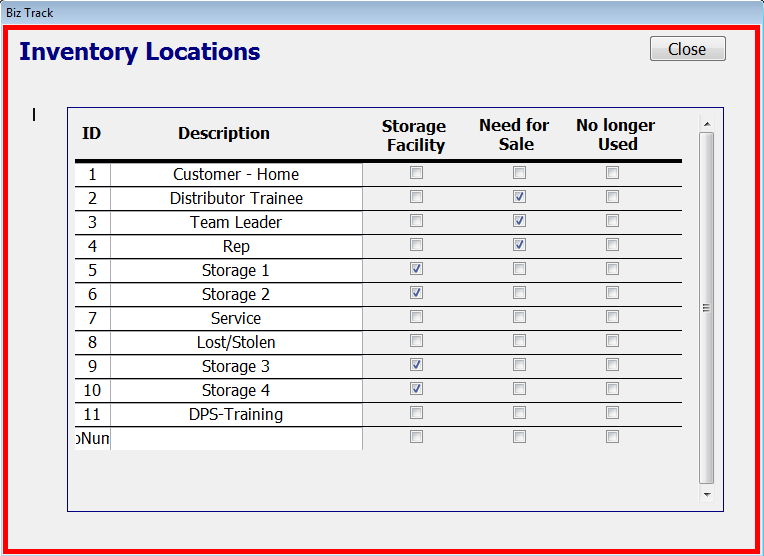
The "Storage Facility" column allows you to check off the Inventory Locations you want to have special Storage rules.
For example, all new Products must first be assigned to a Storage Facility when you first enter new inventory into BizTrack.
From there you can assign the Products to other locations such as a Team Leader or DT via the Inventory: Consign Products form.
Additionally, inventory serial numbers can only be changed or deleted when they are in a Storage Facility. If you add new Inventory "Storage" Locations make sure you check the box to the right.
The "Need for Sale" column allows you to choose which Inventory Locations will be used as a location that a serial number must be assigned to first before it can be sold. This will be the serial numbers in the Sales Form that appear when you select the "Enter Serial #" drop-down box. For example, a Product can not go from a Storage Facility to a customer's home without someone taking it. In almost all cases this will be a Rep, Team Leader or DT, that is why their locations are checked off.
The "No Longer Used" column allows you to check of the Inventory Locations you no longer use. You can not delete an Inventory Location once it is created, but you can change its name. You can not delete locations because there may be records that include an Inventory Location.